3-5 Think Before You Trust: AI Safety for Kids

What happens when GPS leads you the wrong way or autocorrect makes a funny mistake? This engaging 40-minute lesson turns AI “oops” moments into learning opportunities. Students act out scenarios, sort safe vs. unsafe AI uses, and design safety posters with the key message: always double-check AI!

3rd - 5th Grade    

AI and Safety

Notes & Preparation

  • Project Length: 1 class period (40–45 minutes)
  • Instructor Note: 
    • Canva Access
    • This lesson introduces the idea that AI can make mistakes and teaches students to be responsible digital decision-makers.
    • Prepare printed or digital scenario cards for role-play.
    • Ensure students understand that humans must double-check AI outputs
    • Prepare scenario cards for small group or class role-play.
      Set up a T-chart poster titled “Safe to Trust” vs “Needs Human Help.”
      Optional: show a short, humorous clip of AI fails (autocorrect or GPS blunders).
  • Files to Load 

Standards

State Standards: AL, AZ, CA, CO, IN, MA, NY, OR, SD, WA, WY
I CAN Standards Sheets
K-2.AP.10, K-2.AP.11, K-2.AP.15, K-2.AP.16, K-2.IC.19
ISTE Standards:
#2, #4, #5
NET Standards:
#1, #2, #6
Learning Objectives
#1-4, #8, #9, #11, #13, #21, #25, #26, #27, #32, #37, #38, #41, #42
CS Standards: 
3A-IC-21, 3A-IC-24 (Impact of Computing)
3A-AP-13 (Debugging / Responsible use of tools)

Engage

Opening: 

“Has a device or app ever gotten something wrong? What happened?”
Examples students may relate to:Autocorrect gone wrong

  • A GPS giving odd directions
  • A music app recommending something strange

Vocabulary

  • Trust – to rely on something as true or safe
  • Double-Check – to confirm that something is correct
  • Mistake – an error or something wrong
  • Safety – avoiding harm or trouble

“AI is smart, but it isn’t perfect. It doesn’t always know the right thing to do. That’s why we always need to think before we trust AI — and be ready to fix its mistakes!”

Project Description:
Students will role-play real-life tech fails that show how AI can make mistakes — and brainstorm how to respond safely. Through collaborative role-play, students practice identifying when AI should be trusted and when a human should step in to double-check. They will then create a Safety Poster to share one key message they learned.

Activity: AI Role-Play Scenarios
Scenario 1:

  • A homework app gives the wrong answer.
  • What should you do? (Double-check with an adult or use another source.)

Scenario 2:

  • GPS tells your family to turn onto a blocked road.
  • What would a smart person do?

Scenario 3:

  • Autocorrect changes “I love pizza” to “I love pigs.”
  • Could this be embarrassing or misleading?

Scenario 4:

  • An AI art generator draws the wrong thing.
  • Do you try again, or assume it’s right?

Explain

Key Talking Points to Emphasize:

  • AI makes predictions, not perfect answers.
  • Smart technology can be helpful, but it’s not human.
  • We must use critical thinking when using AI.
  • It’s our job to ask questions and check results.
  • AI is a tool, not a brain
  • Why do you think AI makes mistakes?”
  • “Who is responsible when AI gives the wrong answer — the computer or the person using it?”
  • “Why is it important to double-check AI?

Learning Outcomes

Students will:

  • Recognize that AI is not always correct
  • Identify when it is appropriate to trust or question AI
  • Practice double-checking AI results
  • Demonstrate safety awareness in real-life tech use
  • Understand how AI can make mistakes
  • Recognize the need to double-check AI suggestions
  • Explore when AI use is safe or unsafe
  • Create a safety poster to communicate best practices

Project

Have the student:

AI Safety Presentation (5-10 minutes)

  1. Open the Presentation 3-5 AI Safety Presentation 
    • Review all the slides carefully.
    • Read through each scenario.
    • Click on the correct answers.

Student Learning Journal (10-30 minutes)

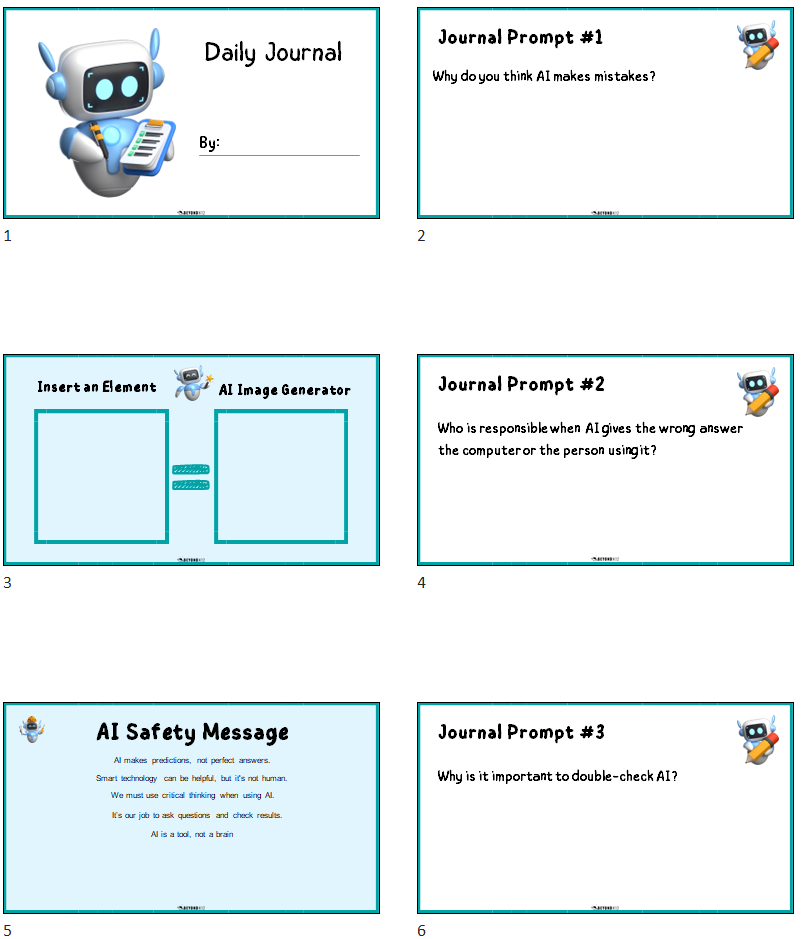
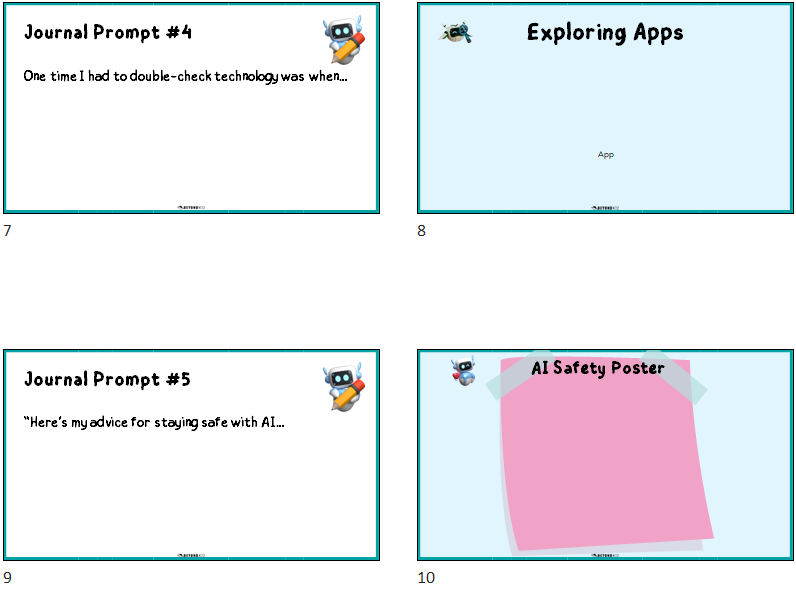
  1. Open the Template 3-5 AI Journal Template
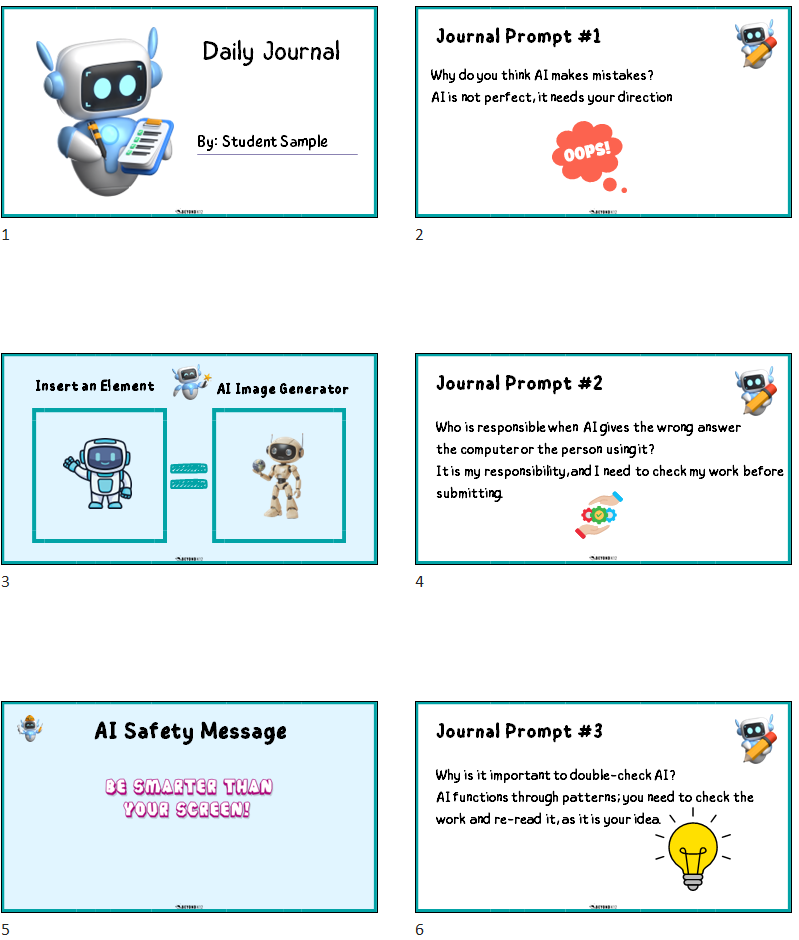
    1. Type your first and last name after the word By: on the title slide.
  2. Slide 2 – Journal Prompt #1
    • Read the question: “Why do you think AI makes mistakes?”
    • Type your response in a few sentences below the prompt.
  3. Slide 3 – Insert an Element & AI Image Generator
    • Add an image element of your choice.
    • Use the AI Image Generator to create a similar image.
  4. Slide 4 – Journal Prompt #2
    • Read the question: “Who is responsible when AI gives the wrong answer, the computer or the person using it?”
    • Write your answer in a few sentences below the prompt.
  5. Slide 5 – AI Safety Message
    • Review the 5 safety messages provided.
    • Choose one message you like best.
    • Copy and paste it using one of the “Type Apps.”
    • Delete the remaining messages.
  6. Slide 6 – Journal Prompt #3 (optional)
    • Read the question: “Why is it important to double-check AI?”
    • Write your response in a few sentences.
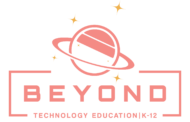
  7. Slide 7 – Journal Prompt #4 (optional)
    • Read the question: “One time I had to double-check technology was when…?”
    • Write your response in a few sentences.
  8. Slide 8 – Exploring Apps
    • Open the Apps Feature.
    • Try one activity of your choice:
    • AI Image Generator
    • Speed Painting
    • Emoji Artist
  9. Slide 9 – Journal Prompt #5 (optional) 
    • Read the question: “Here’s my advice for staying safe with AI…”
    • Write your answer in a few sentences.
  10. Slide 10 – AI Safety Poster
    • Design a poster with a clear safety message.
    • Add a background, copy your chosen message from Slide 5, and insert creative elements.

Evaluate

Quick Check / Share Out

  • Ask: “When should we trust AI?”
  • “What should we do if AI makes a mistake?”
  • Review the safety chart and posters together.

Teacher Notes

  • Collect safety posters or reflection pages
  • Use class discussion to identify if follow-up is needed
  • Optional: add posters to student portfolios

Elaborate

  • Make a video PSA: “How to use AI safely”
  • Quiz game: “Trust It or Double-Check It?”
  • Research project: AI fails in the real world (news, YouTube, apps)